Welcome to (en)Krypta


         (en)Krypta is a general purpose encryption studio which by means of several algorithms allows ensuring file and text storage on the computer and its safe delivery via the Internet.


(en)Krypta is part of xphere, a global security system for controlling and watching one or more nets and all the elements involved in data processing and transmission.

Learn more about (en)Krypta

Encryption

- how to encrypt a text ?
- how to save an encrypted text on your computer ?
- how to send an encrypted text via mail  ?
- how to encrypt a file ?
- how to attach an encrypted file in a mail ?

Decryption

- how to decrypt a text with known algorithm and key ?
- how to decrypt a text with known algoritm and unknow key ? (using G-Force)
- how to decrypt a text with unknown algoritm and key ? (Using G-Force)
- how to decrypt a file ?
- how to save a decrypted file on your computer ?

Mail

- how to send a mail

Tools

- why these tests ?
------------------------------------------------------
- Perform a Wald-Wolfowitz test ?
- how to make a Frecuency test ?
- how to make a Gap test ?
- how to make a Serial test ?
- how to make a Coupon Collector´s test ?
- how to make a Permutation test ?
- how to make a Maximum-of-t test ?
- how to make a Diehard tests Battery ?
  ------------------------------------------------------
- how to generate random numbers ?
- how to use and get the standard calculator started ?
- how to use and get the statistics calculator started ?


Settings

- how to configure your mail acount ?
- how to configure key size ?
- how to configure the language of (en)Krypta ?

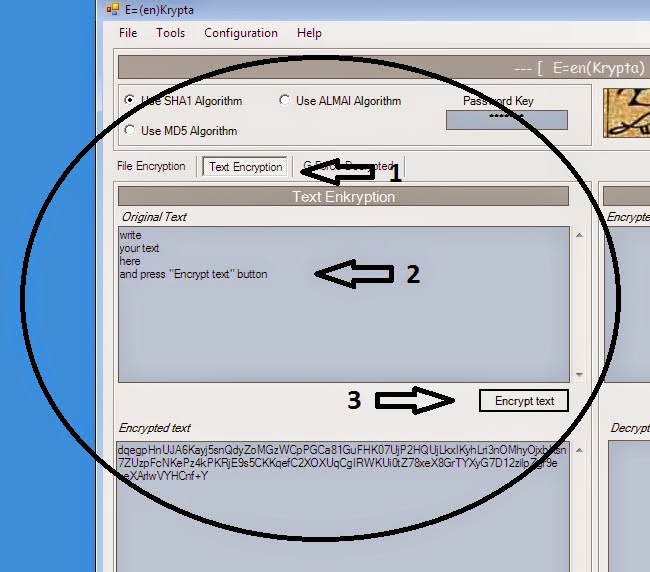
how to encrypt a text ?


First of all, select algoritm and write a key


 and then

1 Click on the Tab "Text Encryption".


2 Write your text.


3 Click on the "Encrypt text" button.


how to save an encrypted text on your computer ?


After encrypting the text


Click on the "Safe as File" button

how to send encrypted text via email


After encrypting the text


Click on the "Send by mail" button


Fill in the fields of the mail window


And click on the "Send Mail" button

how to encrypt a file


After encrypting the text


 Click on the "Send by mail" button


Fill in the fields of the mail window


And click on the "Send Mail" button

how to attach an encrypted file in a mail


1 - Add a file to be encrypted


2 - Encrypt it 


3 - And click on the "attach to a mail" button


Finally fill in the filds "to", "subject" and "body".


You can encrypt the "subject" and "body" fields itself before sending the mail if you want.

how to decrypt a text with known algorithm and key


1) Click on the "Text Encryption" tab.

2) Writte the password key


3) Paste the encrypted text and click on the "Decrypted text" button

 
4) It's possible to save the decrypted text on a file.

how to decrypt a text with known algorithm and unknown key


1) Click on the "GForce Decription" Tab

2 ) Paste the text to be decrypted and then click on the "Decryption Text" button


3) Go to the "Decrypt" Window, select algorithm and click on the "start Decryption" button.


4) Wait for the result. In the free version you will only be allowed to decrypt one text each time.

how to decrypt a text with unknown algorithm and key ?

1) Select the "GForce Decription" tab

2 ) Paste the text to decrypt and then click on the "Decryption Text" button


3) Go to the "Decrypt Window", select "unknow algorithm" and click on the "start Decryption" button.


4) Wait for the result. In the free version you will only be allowed to decrypt one text each time.

how to decrypt a file ?

how to decrypt a file

how to save a decrypted file in your computer ?

save a decrypted file on your computer

how to send a mail ?

send mail ?

why these tests ?


All the tests listed on the menu are usefull tools for measuring the degree of randomnes of a given series. So you can choose a test, enter a series of your choice (elaborated by you or with the help of a pseudorandom number generator) and check out if the series passes the test, that is if according to it the sequence has an "acceptable degree of randomnes"; in other words, if the input series resembles a trully random series as it is defined in a mathematical way.

One of the main applications of these tests is to check if a selected PRNG works well, if it has been well constructed and generates "strong" pseudorandom number sequences. In cryptography, it's usual that an encryption algorithm has a PRNG inside its code. And as you know, it's impossible to create a good cipher if it is based on a bad PRNG. We cannot state the same vice-versa, as a good PRNG doesn't guarantee that using it in an encryption program will yield a good ciphertext. But since the absence of a strong PRNG leads nowhere, here we have some tools to check out if a PRNG is acceptable to some degree of certainty; or more precisely, tools that enable us to state if a PRNG is bad, but without mentioning if it's good in any case. Despite this "pesimistic" approach, wich is mandatory when focusing on this topic, what is true is the fact that a single test passed by your PRNG doesn't mean too much, but each new test that is passed, makes it a bit more probable that the PRNG is satisfactory. So, use the tests as a statistical tool to measure the quality of any PRNG or sequence of your choice.

how to perform a Wald-Wolfowitz test ?


Input the random number and press "Start Test" button.


The analysis results are shown in the bottom of the form

How to make a Frecuency test


Input the secuence to be tested and press "Calculate" button.


Click on the "Safe as File" button

how to make a Gap test

how to make a gap test

how to make a Serial test

how to make a Serial test

How to make a Fips test

Fips test

How to make a poker text

Poker Text